Why Shop at United Copiers?
Established in 2013, United Copiers is a reliable provider of robust, high-quality multifunction office printers and copiers, wide-format printers, scanners, duplicators, and related printing consumables. Explore our online store to easily evaluate the costs of various devices, purchase equipment online, or contact with an expert to discuss your printing needs.
Benefits of Ricoh printers
XRicoh printers are celebrated for their consistent quality, reliability and advanced features in the imaging industry. With their innovative design and commitment to sustainability, Ricoh printers streamline your printing workflow while upholding eco-friendly standards. Supported by a dedicated team and exceptional customer service, they stand out as a premier choice in the printing industry.
Discover the benefits of Ricoh's multifunction printers below and shop featured devices from their range.
 Outstanding reliability
Across the industry, Ricoh devices are lauded for their consistent and reliable performance. The brand's longstanding history and global achievements are testimony to its unwavering commitment to quality.
 Intuitive print production and management
Ricoh empowers businesses to deliver consistent, high quality prints with incredible devices and software to provide an efficient and intuitive workflow across devices.
 Cutting-edge systems
Driven by creative thinking and the vision of its dedicated staff, Ricoh printers are designed to meet the evolving needs of the modern world, ensuring vital business information remains accessible.
 Robust security features
Ricoh printers offer advanced security features, including hard disk, WPA2 & SSL/TLS encryption, user authentication/restriction and more, ensuring that your documents and data are safeguarded.
 Commitment to environment and sustainability
Ricoh is a leader in eco-friendly printing, prioritising eco-efficiency during production and the operational lifespan of products. Ricoh is also committed to sustainability goals such as achieving net zero GHG emissions across their value chain.
 Cost effective
Ricoh produces cost efficient devices that provide a long lifespan, excellent reliability and specific cost control features to help you manage and forecast printing expenditures.
Featured Ricoh printers
Discover our collection of high-performance Ricoh multifunction office printers, ideal for both budding start-ups and established corporations.
Ricoh produces a wide range of user-friendly products that fuse innovative design and unmatched consistency. Ricoh printers stand out as a top choice for streamlining office printing workflows.
Explore our featured new, refurbished, or remanufactured products below, and browse Ricoh multifunction printer models in our store. You can also contact us to discuss your printing needs with one of our specialists.
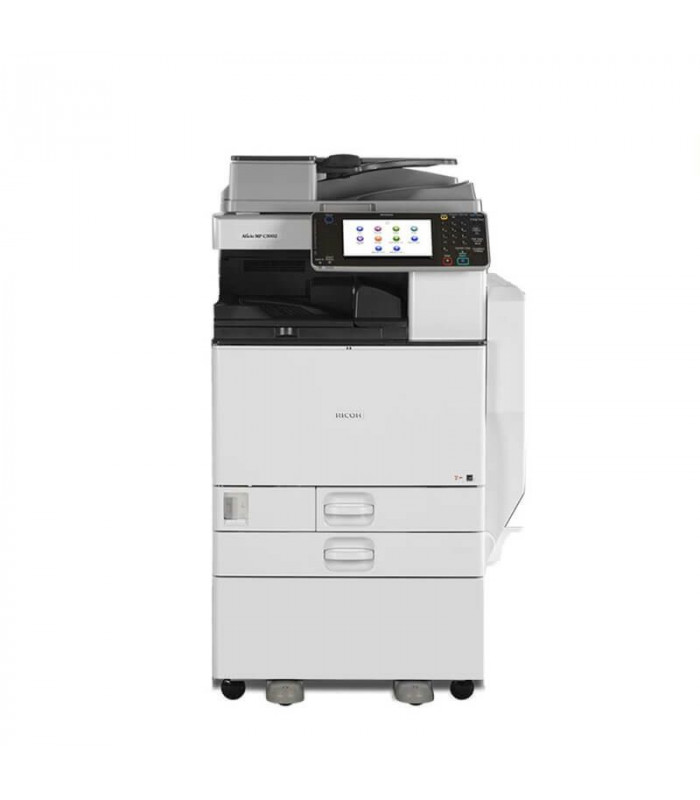
Remanufactured Ricoh Aficio MP C5502 Multifunction Printer
R 45,423.85 incl. VAT
60 Months for R 1013.00 pm.
36 Months for R 1487.00 pm.
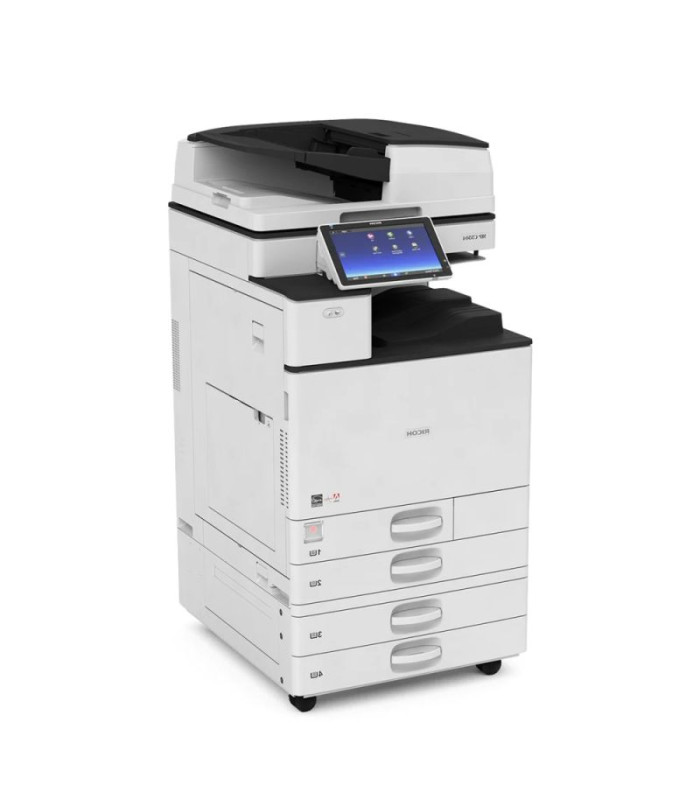
Remanufactured Ricoh Aficio MP C6004 Multifunction Printer
R 59,223.85 incl. VAT
60 Months for R1 319.00 pm.
36 Months for R1 975.00 pm.

Refurbished Ricoh Aficio MP 201SPF Multifunction Printer
R 26,448.85 incl. VAT
60 Months for R 599.00 pm.
36 Months for R 880.00 pm.
Original Epson Ink Cartridge
R 54,837.75 incl. VAT
60 Months for R 1388.00 pm.
36 Months for R 2039.00 pm.
What does Ricoh do?
Established in 1936, Ricoh is a key player in the imaging industry, having made its mark for nearly a century.
Ricoh manufactures a range of products from advanced printers and copiers to interactive whiteboards, cameras, document management software, and more.
Shop Ricoh multifunction printers from United Copiers and enquire to get specialist assistance from our team.

Browse Ricoh multifunction printers for sale in South Africa at United Copiers
Support your office printing operations with Ricoh's top-tier multifunction printers, offered by United Copiers - a leading South African multi-brand B2B print solutions supplier with over 35 years of expertise.
We offer the sale, rental, and servicing of a wide variety of multifunction office equipment, copiers, and scanners, including new, refurbished, and remanufactured Ricoh devices.
Browse our selection of Ricoh multifunction printers to discover the ideal fit for your printing needs, or explore our entire collection of office printers. For tailored advice, feel free to contact us to chat with our expert team.
Remanufactured Ricoh Aficio MP C5502 Multifunction Printer
R 45,423.85 incl. VAT
60 Months for R 1013.00 pm.
36 Months for R 1487.00 pm.
Frequently asked questions about Ricoh printers
Ricoh found its origins in Tokyo, Japan, in 1936. Originally established to produce sensitized paper for the photographic industry. manufacture office equipment and consumables in the United States. Its innovative products rapidly elevated Ricoh to a prominent position in the print sector. Over time, Ricoh has diversified its product range, offering optical and image processing technologies to expand into the wider imaging industry.
Ricoh is renowned for its state-of-the-art imaging and printing solutions. The firm manufactures business-oriented printing equipment, including multifunction printers, scanners, and copiers, complemented by a suite of print management software tailored for diverse printing needs.
Their offerings range from advanced multifunction systems and automation services to efficient document management software. Beyond its technical prowess, Ricoh is also acclaimed for its dedication to eco-friendly practices, creative thinking and continuous innovation.
Yes, Ricoh is universally recognised for its reliable, high-performance printers. Building on a legacy of innovation, their devices blend sustainability, top-tier printing quality, cost efficiency and cutting-edge features, serving a range of businesses across various industries.
With appropriate upkeep and consistent servicing, Ricoh printers can last for many years, frequently surpassing their projected lifespan. Particular models are also selected for refurbishment or remanufacturing to prolong their operational lifespan. Their durability is credited to their sturdy construction and premium components, positioning them as a trustworthy choice for businesses.
Yes, Ricoh produces a colour multifunction printer lineup that provides vibrant, high-quality colour outputs, meeting the diverse printing needs of businesses and individuals.
Absolutely, Ricoh offers office printers, at an affordable price, tailored for home office settings to support hybrid working. Their products enable greater productivity and ensure you find the right product for your workspace needs.
Kyocera and Ricoh are leading brands in the imaging industry. Choosing between them usually boils down to specific requirements and preferences.
Each brand offers trustworthy and adaptable print solutions, incorporating their own innovative design and print infrastructure.
Variations may arise in initial investment, upkeep, efficiency, dependability, and broad functionality. Therefore, when making a choice, it's imperative to assess your print workflow and the performance of the selected model to align with your goals.
No, Canon and Ricoh are distinct entities that both produce quality devices in the printing industry. Depending on the printer model, results may be comparable between the two brands, however, Canon is specifically recognised for its exceptional performance when producing colour prints.
Ricoh is highly regarded for its advanced printing solutions, but the industry is rich with alternative brands that provide competitive offerings. Some worthy contenders include Kyocera, Konica Minolta, Canon, and Xerox. Each brand brings its unique advantages to the table, so it's essential to analyse specific printing needs when considering an alternative to Ricoh or any other brand.
To set up a Ricoh printer, start by unboxing the device and inserting cartridges. Connect it to a power outlet, establish a connection to your computer or network, and install the required drivers. For precise guidance, refer to your printer model's manual or the Ricoh website. Access user guides, drivers, and software through their support and downloads centre. For expert assistance, feel free to contact us.
Setting up your Ricoh printer on a wireless network enhances flexibility and allows for remote printing. Follow these simple steps for a hassle-free connection:
- Ensure the Ricoh printer is powered on.
- Access the printer's touch panel or screen menu.
- Navigate to the "Network" or "Settings" section.
- Find and select "Wi-Fi" or "Wireless LAN" settings.
- Choose your desired Wi-Fi network from the available list.
- Input the network's password when prompted.
- Confirm the connection. Once connected, the printer should display a successful connection message.
- As a final step, print a test page to verify the connection.
For specific models or more detailed setups, always refer to the Ricoh printer manual or Ricoh's online support resources.
Utilise the Ricoh Smart Device Print & Scan app, available for iOS and Android. This app lets you wirelessly send print tasks to Ricoh printers, and receive scanned images on your device. Offering a range of features, including cloud storage access and enhanced security options, it streamlines printing and supports BYOD strategies.
To connect a Ricoh printer to your computer, first ensure the necessary drivers are installed. Connect the printer via USB or network cable, and follow your operating system's prompts. Alternatively, if connecting wirelessly, ensure both devices are on the same network and use the printer's settings to establish a connection. Always refer to the specific model's manual for detailed steps or consult Ricoh's online support resources.